Best AI Subtitle Remover 2026: Offline Batch (85-90% Quality)
Eliminate distracting burned-in text with the most advanced AI subtitle remover. Built for professionals seeking offline-first, batch processing, and exceptional inpainting over complex backgrounds.
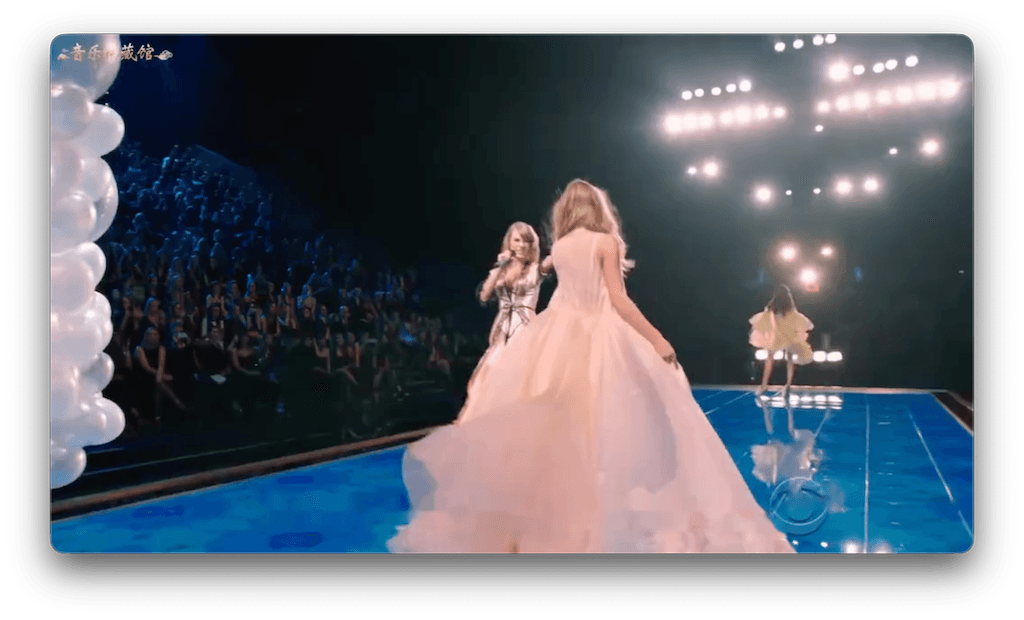
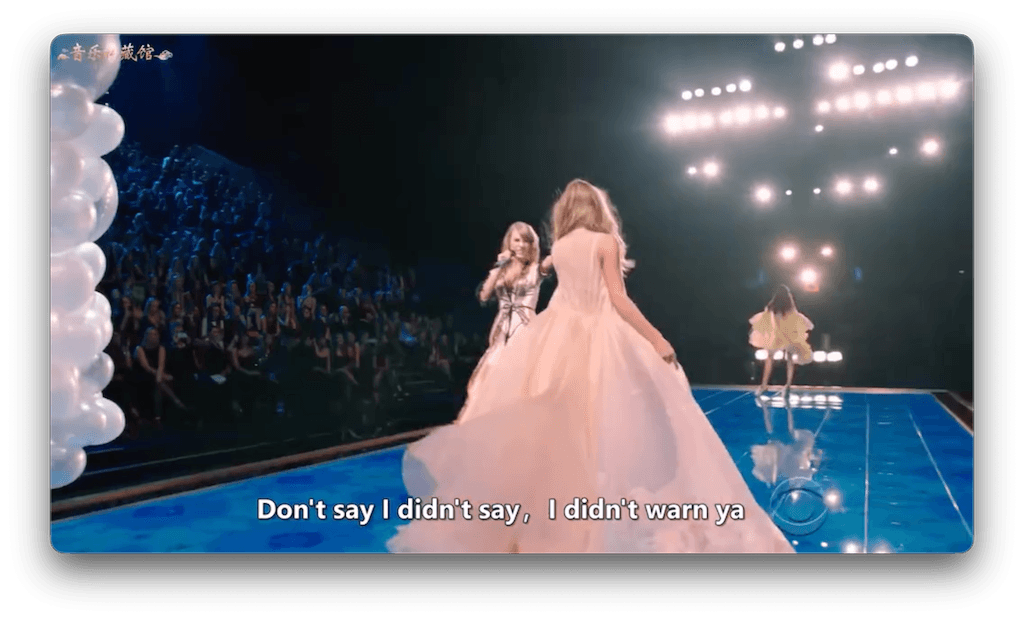
1. Best AI Subtitle Remover 2026 Comparison
We tested the top tools for subtitle removal across the web and desktop. Here's how the leading hardcode subtitle remover solutions stack up based on quality, privacy, and batch capabilities.
| Tool | Type | Format Limits | Best Use Case |
|---|---|---|---|
| EchoSubs AI | Offline Desktop App | Unlimited | Batch processing, high quality & privacy |
| Online AI Tools (e.g. Media.io) | Cloud / Web | Usually 100MB-500MB | Quick fixes for small TikTok/Reels clips |
| Video Editors (Premiere/Resolve) | Desktop Software | Unlimited | Manual blurring/cropping by professionals |
| Open Source CLI tools (GitHub) | Command Line | Unlimited | Developers who can compile Python scripts |
2. EchoSubs: Top Offline AI Subtitle Removal
EchoSubs distinguishes itself as the definitive subtitle remove application by being completely offline-first. Most solutions found online struggle with file sizes over a few hundred megabytes, forcing you to compress your high-quality footage. EchoSubs ensures that your source files never leave your computer, protecting your data privacy while unlocking unlimited file processing capabilities utilizing your machine's dedicated GPU.
3. How AI Removes Hardcoded Subtitles
Older software attempted to remove subtitles either by clumsily cropping the bottom 15% of the video or by applying a heavy Gaussian blur. Both methods degrade the viewing experience.
Modern AI algorithms take a completely different approach called Video Inpainting. First, Optical Character Recognition (OCR) neural networks scan the video frame by frame to identify exactly where the hardcoded text is overlaid. Once the pixels forming the text are detected, generative AI analyzes the surrounding visual context—both in the current frame and adjacent frames—to mathematically hallucinate and replace the missing pixels, blending them seamlessly with the background.
4. Hardcoded vs Embedded Subtitles Removal
Wait... Is it Hardcoded?
Hardcoded (or burned-in) subtitles are text elements that have been permanently rendered into the video's image data during export. You cannot toggle them off in a media player. Removing these requires an AI hardcode subtitle remover like EchoSubs to reconstruct the pixels behind the text.
Embedded Subtitles
Soft or embedded subtitles are text metadata tracks included alongside the audio and video tracks within an MKV or MP4 container. You can disable these natively in VLC or QuickTime. An embedded subtitle remover is typically just a fast muxing script that strips the text track without needing complex AI processing.
5. AI Subtitle Removal Quality Expectations
While AI has revolutionized the editing space, it's vital to have realistic expectations. No AI tool currently existing can claim 100% flawless removal in every scenario.
- 90%+ Quality (Simple Scenarios)If subtitles are placed over static backgrounds (like a clear sky, a solid wall, or blurred bokeh depth of field), EchoSubs can remove them almost flawlessly, leaving virtually no trace.
- 85-90% Quality (Standard Scenarios)For typical videos with standard motion and varied lighting, you can expect highly satisfactory results. The AI might leave minimal smudging observable only upon close pause-and-zoom inspection.
6. Free vs Pro AI Subtitle Tools
A "free AI subtitle remover" often acts as a lead generator for expensive cloud subscriptions. basic online tools limit exports to 720p, enforce 100MB caps, or overlay watermarks. Choosing a pro offline desktop tool unlocks true batch AI subtitle removal, utilizing your own hardware to process terabytes of 4K video simultaneously without recurring hidden compute fees.
Compare Pricing Plans vs Cloud Alternatives7. Step-by-Step Subtitle Removal Workflow
Import Your Video
Drag and drop your MP4, MOV, or MKV file directly into EchoSubs. The file stays safely on your local hard drive.
Configure Detection Area
Use the bounding box overlay to hint to the AI where the text appears (usually the bottom 20% of the screen). This dramatically speeds up processing.
Execute Offline Processing
Hit remove. The AI engine spins up locally using your GPU to reconstruct the background smoothly.
8. Handling Complex Backgrounds/Faces
The true test of a premium subtitle remover lies in handling moving faces behind text. When subtitles obscure facial expressions, inferior tools create terrifying distorted smudge marks. EchoSubs integrates localized pixel-tracking to accurately preserve the shape of jaws, lips, and moving hands when reconstructing the layers beneath hardcoded typography. If an area is overwhelmingly complex, the AI gracefully degrades to a soft, context-aware blur rather than hallucinating incorrect geometry.
9. Batch AI Subtitle Removal Tips
- Standardize your text regions: If you are batch processing a 20-episode anime or TV series, make sure the subtitles appear in identical locations so you can apply the same bounding box parameters to all files.
- Run overnight: Intensive video inpainting is heavy on computation. Load your backlog into the EchoSubs queue and process overnight using our specialized Batch Processing Workflow.
Frequently Asked Questions
What's the best AI subtitle remover in 2026?
EchoSubs is the best offline AI subtitle remover specifically designed for desktop batch processing, offering 85-90% removal quality and complete data privacy.
Can AI remove hardcoded subtitles completely?
AI achieves 85-90% quality generally, and 90%+ on simple backgrounds. No tool is 100% perfect, but EchoSubs gets extremely close using advanced inpainting algorithms.
Does EchoSubs handle subtitles over faces and complex backgrounds?
Yes. Our AI utilizes advanced scene tracking to carefully reconstruct pixels over faces and complex areas, avoiding the 'blurred rectangle' effect common in older tools.
Should I use a free AI subtitle remover or a paid one?
Free tools are okay for occasional short clips, but often limit file size, watermarks, or processing speed. For batch video processing, 4K resolution, and offline data security, a pro tool like EchoSubs is recommended.
How long does AI subtitle removal take?
Processing speeds depend on your local hardware since EchoSubs runs offline. On an M1/M2 Mac or a modern PC with a dedicated GPU, it typically takes about 2 minutes to process a 10-minute 1080p video.
Can I batch process multiple videos to remove subtitles?
Absolutely. EchoSubs Desktop is built with bulk operations in mind. You can queue up multiple videos, set your parameters, and let the batch AI subtitle removal process run in the background.
What is the difference between hardcoded and embedded subtitles?
Hardcoded (burned-in) subtitles are permanently drawn onto the video frames. Embedded (soft) subtitles are stored as distinct data tracks inside the video container (like MP4 or MKV) and can be easily toggled on or off.
Does removing subtitles reduce video quality?
Older cropping methods ruin composition, and basic blurring is distracting. EchoSubs uses state-of-the-art AI video inpainting, reconstructing the missing pixels so the rest of the video remains pristine without significant quality loss.
Is there a size limits for videos?
Unlike online AI subtitle removers that often restrict you to 100MB or 500MB, EchoSubs runs entirely offline on your machine with no video size or length limits.
Will this tool translate the subtitles it removes?
Our core subtitle remover module just removes the text. However, EchoSubs also offers features to generate new, translated subtitles if you are repurposing the video for foreign audiences.
Do you offer a Low Cost Trial?
Yes, we offer a Low Cost Trial so you can test the AI subtitle removal quality on your own clips before fully committing.
Is an internet connection required to remove subtitles?
No! Privacy is paramount. The AI models run completely locally on your hardware, making it the perfect offline AI subtitle removal solution for sensitive content.
How is this better than video editing software like Premiere Pro?
Traditional NLEs require you to manually mask out subtitles frame by frame or apply a generic blur. EchoSubs automates the entire detection and removal process using AI inpainting.
Does it work seamlessly on both Windows and Mac?
Yes, the EchoSubs desktop app is cross-platform, taking full advantage of Apple Silicon on Macs and Nvidia GPUs on Windows for fast GPU-accelerated processing.
Ready to Clean Up Your Videos?
Further Reading