Why Your Subtitle Remover Isn't Working
If you've scoured r/DataHoarder or r/ArtificialIntelligence asking "Do any real subtitle remover tools exist?", you already know the painful truth: most "AI Removers" just slap a blurry box over the bottom of your video. Let's talk about why they fail, and what true AI Inpainting actually looks like.
The r/DataHoarder & r/AskTechnology Complaints
"What tool can remove burned in subtitles for large archives?"
"Every tool I try just leaves a massive blurred rectangle across the bottom third of the video. It ruins the anime I'm trying to archive. Also, I have 100+ episodes, I can't upload 150GB of video to Media.io..."
"Is there an AI tool that actually removes them?"
"I don't want a blur. I want the AI to guess what was behind the text and draw it back in. Pollo AI and AniEraser just seem to be doing advanced smudging without respecting timestamps. Does a real tool exist?"
Why Most Subtitle Removers Don't Work as Expected
1. They Use "Broad Blurring", Not AI
A massive secret in the online software industry is that many "AI Removers" aren't using generative AI at all. They run a basic OCR (Object Character Recognition) script to find where text is on screen, and then apply a standard Gaussian Blur to that coordinate box. It looks terrible and creates a distracting smear.
2. They Ignore Timestamps
Many bad tools don't respect the temporal nature of video. If someone speaks for 2 seconds, the tool blurs the bottom of the screen for the entire 10-minute video, ruining scenes where no text even existed.
3. Hardcoded Anime is Notoriously Difficult
Anime features panning 2D backgrounds and stylized shading. When text is "Hardcoded" (burned directly into the pixel data, replacing the drawing behind it), simple removers fail because they can't understand the drawn perspective to fill the hole back in properly.
4. Server Limits Destroy Quality
True Inpainting (redrawing missing pixels frame-by-frame) is computationally extremely expensive. Online websites (like Media.io) cannot afford to spend 2 hours of expensive Nvidia GPU time on your free web upload. So, they intentionally use low-quality, fast-pass models to save server costs.
Let's Be Honest: What Quality Can You Actually Expect?
No company should claim "100% flawless magic removal". The pixels behind the hardcoded text are literally gone. The AI is hallucinating what should be there. Here is the realistic quality metric you will get from a tier-1 tool like EchoSubs:
Simple Backgrounds: 90-95% Perfect
If the text is over a solid wall, a clear blue sky, or an out-of-focus background depth map, the generative AI is incredibly accurate. You will likely not even notice the text was ever there.
Typical Cinematic Shots: 80-85% Quality
For standard movie shots with characters moving in the background, you will get a slight "water ripple" effect where the AI is rapidly guessing textures frame-by-frame. It is far superior to a blur box, but a highly trained eye looking at the bottom of the screen will see AI artifacts.
Chaotic High-Motion: 60-75% Quality
If the text sits over an exploding car with hundreds of flying debris particles, the AI will struggle to recreate the chaos perfectly. You will notice artifacts.
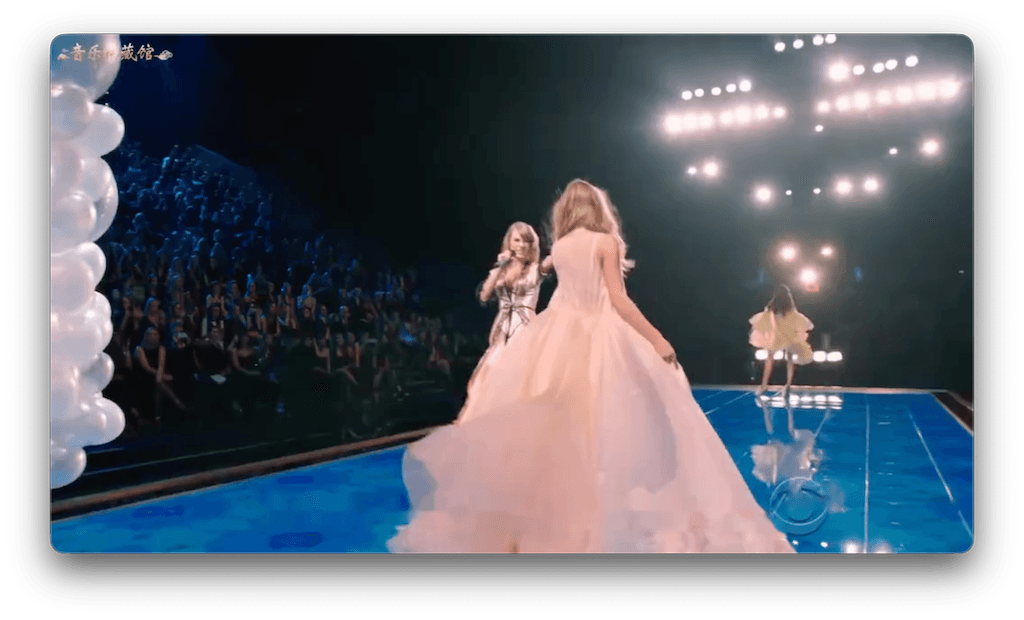
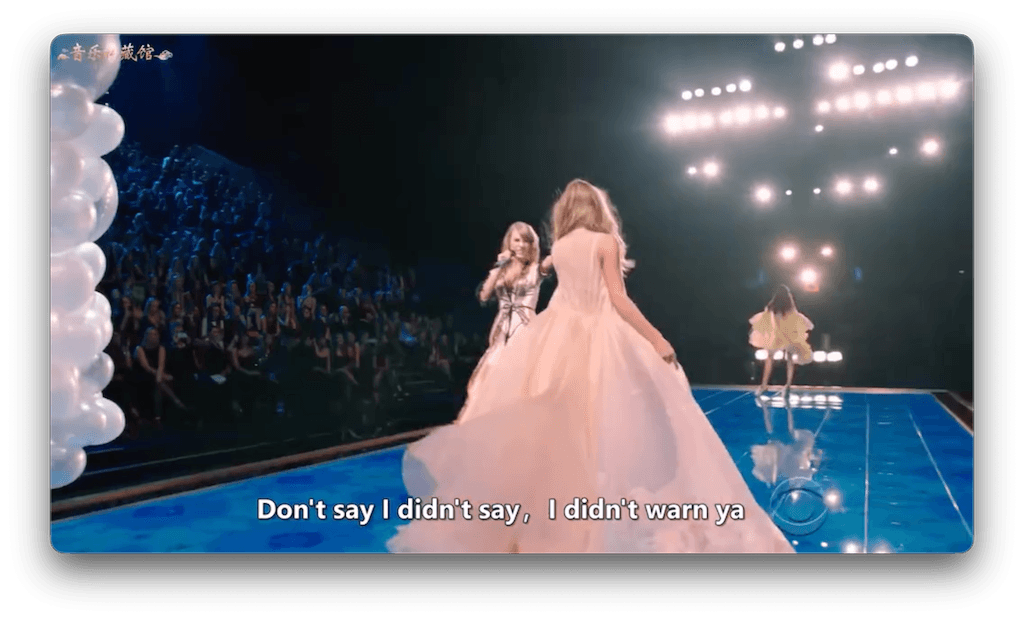
Hover image to see the original hardcoded text
basic web tools vs Paid Offline Tools: The Real Difference
| Feature | basic online tools (Media.io, etc) | EchoSubs (Offline AI) |
|---|---|---|
| Underlying Technology | Basic crop, mask, and heavy Gaussian Blur. | True Generative Neural Inpainting. |
| Video File Size Limit | Usually capped at 50MB - 500MB max. | Unlimited (Can process 50GB 4K MKV files). |
| Privacy / Data Safety | You upload your videos to their servers. | 100% Offline processing. Zero uploads. |
| Batch Processing Archives | Impossible. One at a time upload. | Yes. Built for Datahoarders to queue folders. |
| Parameter Tuning | None. One button click only. | Advanced tuning + Online AI Parameter Advisor available. |
When to Outsource vs Do-It-Yourself
If you are a professional studio trying to restore a $50,000 film reel where the raw files were lost and only a hardcoded copy remains, you should hire a VFX artist on Upwork to manually rotoscope and paint out the text frame-by-frame (Cost: Thousands of dollars).
If you are an enthusiast, archivist, or content creator who needs affordable, automated batch-processing that looks 85% better than a blur box, Offline AI Inpainting is the only viable path in 2026.
Frequently Asked Questions
Why does my subtitle remover leave blur/residue?
Because it's likely a cheap web tool that isn't using AI. It identifies text and applies a localized blur filter over the pixels to obscure them, rather than generating new pixels to replace them.
Can AI remove hardcoded subtitles from anime?
Yes, but it's challenging. Anime's 2D backgrounds require an AI that understands drawn textures. EchoSubs utilizes inpainting models that perform well on the flat color shading typical of anime, much better than standard photo-blur tools.
What's the difference between hardcoded and soft subtitles?
Soft subtitles are separate text files attached to the video that you can turn off in VLC. Hardcoded (burned-in) subtitles are permanently drawn into the actual video image and cannot be simply 'turned off'.
What's the typical quality expectation?
For true generative AI, expect an 85 to 90 out of 100 visual quality score. Simple backgrounds can hit 95% perfect. Complex chaotic scenes will show minor blurring or 'water ripple' artifacts.
Why do basic online tools underperform?
True AI inpainting requires massive GPU compute power. Free websites cannot afford to pay for Nvidia server costs for your free video, so they use cheap, decades-old blur algorithms instead.
How long does offline processing take?
It depends heavily on your local Mac or PC hardware. A strong dedicated GPU can chew through a 20-minute episode in minutes. An old laptop relying on CPU might take an hour.
What is the difference between blur and inpainting?
Blurring takes existing pixels and smears them together to hide text. Generative Inpainting analyzes the surrounding environment and artificially hallucinates the missing background (e.g., drawing the rest of a brick wall where the text used to be).
Can I batch process multiple videos?
Yes. For datahoarders and archivists, EchoSubs allows you to drag an entire folder of MKV or MP4 files and walk away while it processes them one after another.
Do online tools compromise privacy?
Absolutely. When you use tools like Media.io or Vmake, you are uploading your video to a third-party server. If the video is sensitive, proprietary, or personal, you should only use Offline software.
Why does my video have artifacts after processing?
Artifacts ('watery' looking spots) occur when the AI fails to perfectly guess the background behind the text, especially in scenes with extremely fast motion or highly complex textures.
Is there a 100% perfect solution?
No. Any company claiming 100% flawless removal of hardcoded text is lying. The original pixels are gone forever. We offer the closest possible approximation via AI.
When should I use offline vs online tools?
Use online tools if you have a 10-second meme video and don't care about quality. Use offline software like EchoSubs if you care about privacy, file size limits, batch processing, and actual inpainting quality.
Deep Dive Topics