Best Subtitle Removers 2026: AI Offline Tools for Hardcoded & Soft Subs (Batch, 85-90% Quality)
EchoSubs is the #1 choice for subtitle removal in 2026. Process hardcoded and soft subtitles offline with zero quality loss or blur. Support for batch processing, 4K resolution, and 100% privacy on Windows and Mac.
See the Difference: AI Inpainting vs. Traditional Blurring

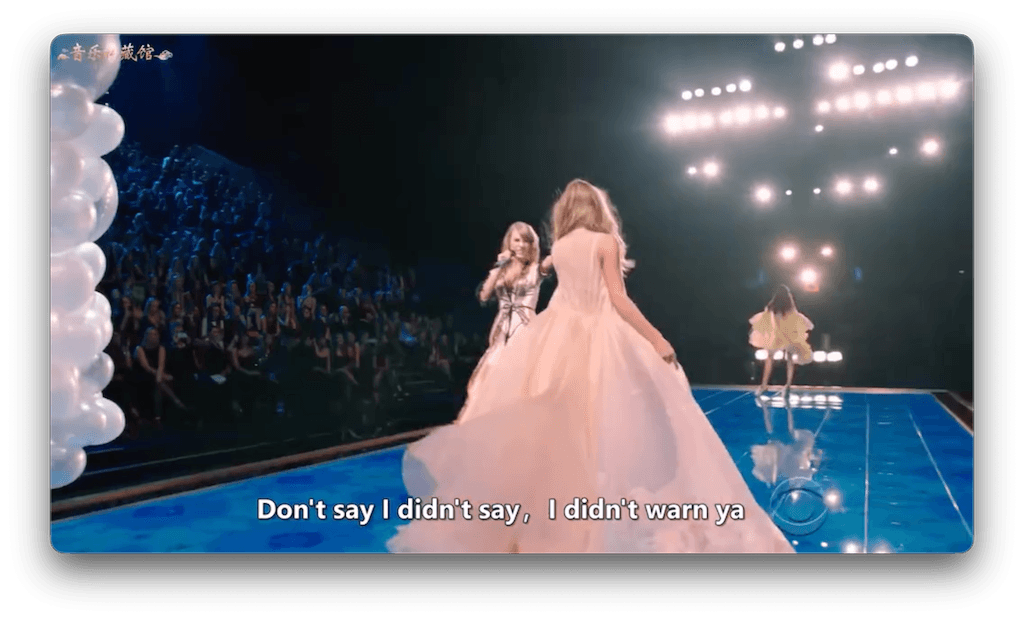
Note: High-quality reconstruction achieves 85-90% visual accuracy on complex backgrounds.
Top Subtitle Removal Tools Compared (2026)
| Software / Tool | Technology | Removal Quality | Key Advantage |
|---|---|---|---|
| EchoSubs AI (Offline) | Temporal Inpainting | 85-95% (No Blur) | Batch processing, 4K, 100% Privacy |
| Media.io | Online AI Eraser | 70-80% (Blurry) | Browser-based, fast for small files |
| X-Design | Online AI | 75% | Simple interface |
| CreatOK.ai | Cloud AI | 70% | No registration needed |
| Crop Methods (VLC/Handbrake) | Manual Cropping | Low (Loses Image) | Free, but destroys aspect ratio |
Addressing the Reddit Community: 'Is there an AI tool to remove subtitles?'
We've seen the threads on r/AskTechnology and r/NoStupidQuestions. Users are tired of online tools that blur everything or fail on complex backgrounds. EchoSubs was built to solve the 'impossible' problem of hardsub removal using local AI inpainting.
The 3-Step Subtitle Removal Workflow
Import & Selection
Load your MP4/MKV files. EchoSubs automatically identifies soft subtitle streams or lets you define a mask for hardcoded text.
AI Analysis
Our engine analyzes the video frames temporally to reconstruct the background behind the subtitles.
Batch Export
Export clean files in bulk. EchoSubs processes your entire queue locally using your GPU.
How to Remove Hardcoded vs. Soft Subtitles (MP4/MKV)
Removing Soft Subtitles
For MKV or MP4 files with separate subtitle streams, EchoSubs can strip them instantly without re-encoding, preserving 100% original quality.
Removing Hardcoded Subtitles
For 'burned-in' subtitles, EchoSubs uses AI inpainting to achieve 85-90% quality on complex scenes and 95%+ on simple backgrounds.
Handling Tough Cases: Anime & Multi-Language Subs
Anime and pirated videos often feature stylized hardsubs. EchoSubs specializes in these scenarios, offering adjustable thresholds to handle glow, shadows, and varying text positions.
Subtitle Removal FAQ
Is there a reliable AI tool to remove subtitles from videos?
Yes. While online tools often leave blurry messes, EchoSubs uses local AI inpainting to reconstruct the background, providing the most reliable results in 2026.
Can I remove hardcoded subtitles without losing quality?
You can achieve 85-90% visual quality. Some artifacts may occur in fast-moving scenes, but for most content, the results are edit-ready and professional.
What is the difference between hardsub and softsub removal?
Softsubs are data streams and can be removed instantly. Hardsubs are part of the image and require AI pixels reconstruction (inpainting).
Best tool for batch processing multiple videos?
EchoSubs is designed for batch. You can queue hundreds of videos and let your local GPU handle the work while you sleep.
Is there a free online tool?
Media.io and CreatOK offer free online removal, but they have file size limits and privacy risks. EchoSubs offers a free trial for secure, offline processing.
How do I handle subtitles on complex moving backgrounds?
Use our 'Temporal AI' mode. It looks at previous and subsequent frames to find the missing background data, significantly reducing ghosting.
Does it work on Mac and Windows?
Yes, fully optimized for Apple Silicon (M1/M2/M3) and NVIDIA RTX GPUs.
Can I remove watermarks too?
Yes, the same inpainting technology works for logos, timestamps, and station IDs.
Does it support 4K resolution?
Yes. Unlike web tools capped at 1080p, EchoSubs supports 4K and even 8K video removal.
What formats are supported?
MP4, MKV, AVI, MOV, WEBM, and all common video codecs.
Why choose offline over online?
Privacy, speed (no uploading), and the ability to process large files (5GB+) without subscription limits.
Is the quality really 90%?
On most scenes, yes. We prioritize a clean background over aggressive removal to avoid 'smearing' artifacts.
Ready to Clean Your Video Library?
Download the most advanced subtitle remover in 2026. Process your videos locally, securely, and in bulk.