Hard Subtitle Removal: AI Inpainting vs Blur Box
Tired of tools that just smear a blurry rectangle over your text? Traditional "removers" only obscure subtitles. True AI models reconstruct the missing background pixels underneath the text. Learn why AI inpainting is the only way to genuinely remove hardcoded subtitles.
What are Hardcoded vs Soft Subtitles?
Soft Subtitles (Easy)
Soft subtitles (like SRT, VTT) are separate text tracks running alongside the video. They can easily be toggled on/off in media players like VLC or YouTube. You don't need any special tool to "remove" them—just turn them off in your player settings.
Hardcoded Subtitles (Hard)
Hardcoded (or "burned-in") subtitles are permanently written into the video frames. They cannot be turned off because they have destroyed the original pixels underneath. Removing them requires guessing and redrawing the damaged background.
Mainstream Methods: Blur/Obstruction vs True AI Rebuilding
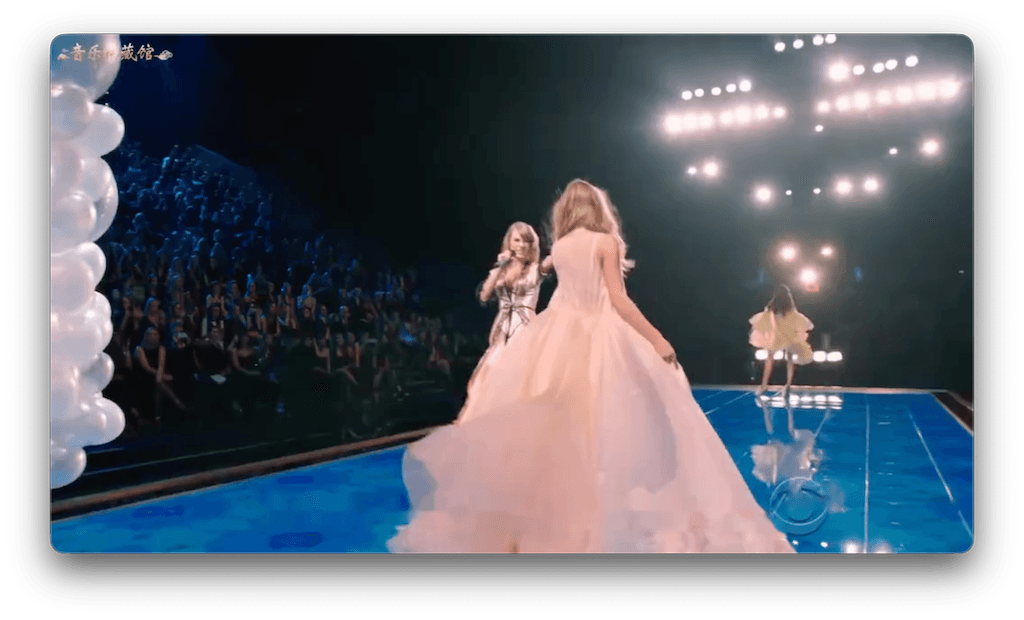
Traditional Blur Method
Most online "subtitle removers" (like Media.io, VideoProc) simply apply a mosaic, gaussian blur, or interpolation effect over the bounding box of the text. They don't remove the subtitle; they just smear it out.
- ✗ Leaves a distracting, blurry rectangular scar on the video
- ✗ Completely destroys background details (faces, textures)
- ✗ Very obvious and unprofessional results
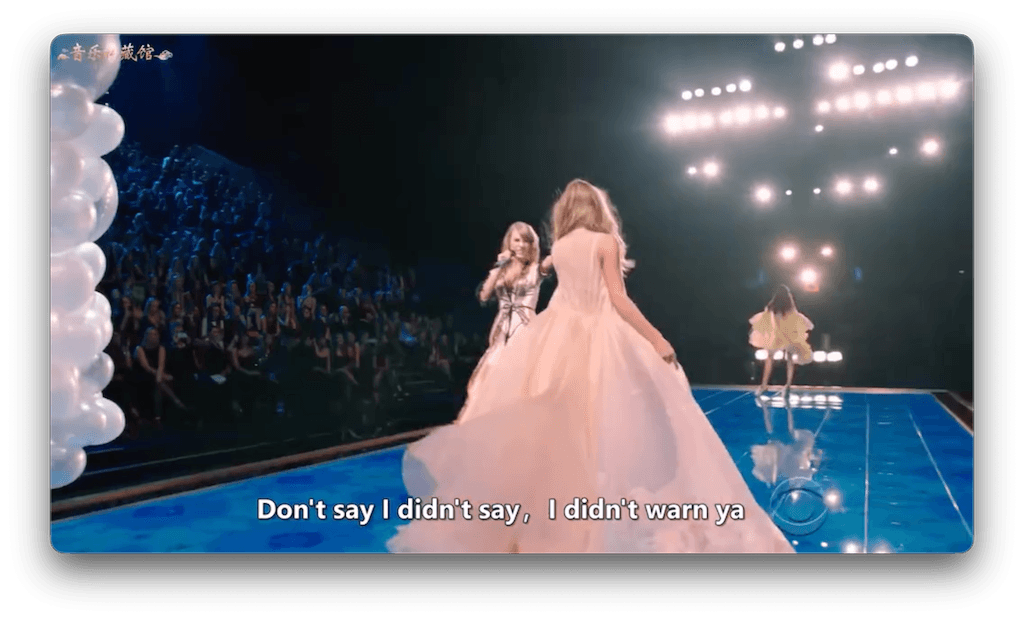
True AI Inpainting
Advanced AI models analyze the surrounding pixels and temporal data (past/future frames) to actually redraw the missing background behind the text. Note: Expect 85-90% perfection; while not flawless, it is vastly superior to blurring.
- ✓ Reconstructs textures, lines, and colors dynamically
- ✓ Achieves a near-seamless background (90%+ on simple scenes)
- ✓ No distracting blurry boxes hovering on screen
Pros and Cons Comparison
| Method | Mechanism | Visual Quality | Best For... |
|---|---|---|---|
| Blur / Crop | Applies frosted glass filter | 30 / 100 | Quick throwaway memes where quality doesn't matter. |
| AI Inpainting | Reconstruction via Neural Networks | 85-95 / 100 | Professional editing, archival, when visual consistency is critical. |
When to Choose Which Method?
If you just need a 5-second TikTok overlay and don't care about a smudged box covering the bottom 20% of the screen, free online blur tools are fine.
However, if you are creating professional content, dubbing a tutorial, or restoring a movie, you must use AI inpainting. Viewers immediately notice and complain about "blur obstruction" on Reddit and YouTube. A clean background is essential for retention.
Our Offline AI Solution
- 100% Offline Privacy: Process massive video files locally. No uploading 10GB files to the cloud.
- GPU Accelerated: Utilizes your local hardware for rapid AI background reconstruction.
- True Generative AI: We rebuild backgrounds texture by texture. No cheap blur boxes here.
Visual Proof: Background Reconstruction
How to Remove Subtitles in 3 Steps
Import Video
Load your MP4/MKV directly into the offline desktop app.
Select Region
Highlight the area containing the hardcoded text.
AI Rebuild
Let the AI inpainting model rebuild the missing pixels automatically.
Why Professionals Switched
"I used to use online tools, but the blur box was so obvious it ruined my edits. The AI inpainting actually redraws the brick wall background. It's not 100% perfect, but it's a solid 90% and infinitely better than a smudge."
— Video Editor, via Reddit"Batch removing Chinese and English hardcoded subs locally saved my life. I don't have to upload massive raw MKV files to random websites anymore. Totally secure and fast."
— Content LocalizerFrequently Asked Questions
Can hardcoded subtitles be completely removed?
Because hardcoded subtitles overwrite original video pixels, perfect 100% removal is nearly impossible. However, true AI inpainting can achieve 85-95% visual perfection by intelligently redrawing the background.
What is the difference between blur method and AI inpainting?
The blur method simply smears the text pixels together, leaving a noticeable frosted glass rectangle. AI inpainting analyzes surrounding pixels and frames to generate new, matching textures (like grass, walls, or clothing) to replace the text seamlessly.
Which is the best hardcoded subtitle remover?
For professional, seamless removal that preserves video quality, an offline tool utilizing generative AI inpainting is superior to ordinary web-based blurring tools.
Why is the blur effect so obvious?
Blur destroys detail. When you have a sharp video with a blurred rectangle where text used to be, the human eye is drawn to the contrasting loss of texture. It ruins immersion for viewers.
Which is better: online tools or offline software?
Offline software ensures absolute privacy, handles massive 4K files instantly, avoids slow upload/download times, and utilizes your own GPU power without waiting in server queues.
Does removing subtitles damage video quality?
Traditional cropping reduces the frame size, and heavy re-encoding lowers the overall quality. AI inpainting targets only the specific subtitle bounding box, attempting to leave the rest of the original high-bitrate video frame completely untouched.
What video formats are supported?
Most offline AI processing supports major video formats including MP4, MKV, AVI, MOV, and WebM.
How long does the processing take?
Processing time depends on your local hardware. A modern GPU significantly accelerates AI inference, often processing at near real-time speeds.
How to ensure the background looks natural after removal?
Adjust optional AI parameters: map the 'subtitle area size' tightly around the text, and adjust the 'scene complexity' setting based on whether the background is simple (solid colors) or complex (crowds/foliage).
Are there free tools?
You can use free tools to crop the video or apply a basic blur filter. True offline AI processing generally exists in premium apps due to the complexity and heavy computational demands of neural networks.
Can I process videos in batch?
Yes. Offline applications excel at batch processing. You can queue up entire folders of episodes or clips.
Does it support Chinese/Japanese/Korean subtitles?
Yes! AI inpainting identifies high-contrast pixel anomalies in the designated region, working equally well on English, Chinese, Japanese, Korean, or any other language characters.
Stop Blurring, Start Rebuilding
Further Reading & Related Topics